
Customizing the BigFix Console Right-Click Menu
Starting with BigFix 6.0, you can install additional functionality for the BigFix Console that will allow you to right-click on a computer in your BigFix Console and perform common tasks directly on that computer. The new options will appear in the drop-down list when you right-click on a computer in the BigFix Console.
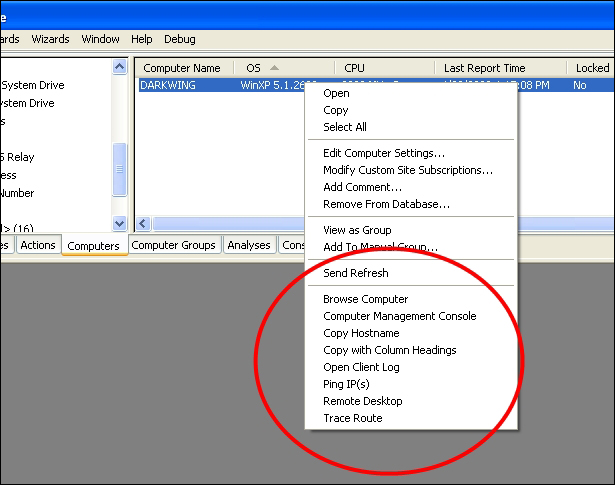
The installed right-click options will only be available for existing users on a computer. If a new user logs onto the computer, you will need to reinstall the right-click options before they will appear in the BigFix Console. Right-click options will be immediately available after installation or uninstall, even if your BigFix Console is currently open.
Note: BigFix Consoles version 7.2.1.357 and below have a maximum limit of 10 right-click options. If you add more than this, the additional options will appear but not work.
Right-click Options
The available right-click options are:
Windows Remote Management
The following BES Console right-click options will only be available on Windows computer, the options will be greyed-out for non-Windows systems. These options are designed to help perform direct management of computers quickly. You must to be logged into Windows with an NT Authenticated account with permissions to computers for these options to work.
- Computer Management Console: Opens the Windows Management Console for the selected computer with access to the Services, Event Log and other common management snap-ins.
- Browse Computer: Opens Windows explorer for the selected computer with access to network shares. Also allows you to quickly get to the C$ share from here.
- Remote Desktop: Opens a Windows remote desktop connection for the computer. Computers must report in 'True' for the 'Remote Desktop Enabled' property for this option to be used.
BigFix Console Tools
The following BigFix Console right-click options are designed to make using the BigFix Console and diagnosing issues easier.
- Trace Route: Opens a command window and runs a trace route to the selected computer.
- Ping IP(s): Opens a command window and runs a ping command for each IP Address on the selected computer.
- Copy Hostname: Copies the selected computer(s) hostname into your paste buffer. Press ctrl-v to paste the hostnames into a text editor after selecting the option.
- Copy with Column Headings: Copies all data for the selected computer(s) along with the column heading names into your paste buffer. The column heading names are property names such as 'Computer Name' and 'OS'.
- Open Client Log: Opens the current BigFix Client log file for the selected computer in a text editor. The option is only available for Windows systems. Requires NT Authentication and access to $ share where the BES Client is installed.
Windows Shell Extensions
The following right-click option appears in the drop-down list when you right-click a file in Windows Explorer (it does not appear in the BigFix Console). The option is designed to assist custom authoring of Fixlets in the BigFix Console.
- Copy Sha1: Computes the Sha1 checksum and Size for the selected file and copies the results into your Windows ClipBoard (paste buffer) as a prefetch action command. Use this feature to quickly generate the download command when distributing custom packages through custom Fixlets.
Creating Custom Right-Click Options
To create your own custom right-click options, follow this procedure:- Create the following registry key if it does not exist:
[HKEY_CURRENT_USER\Software\BigFix\Enterprise Console\Settings\ComputerListContextMenuExtensions] - Create a subkey with a unique name for the Right-Click Menu option. Example:
[HKEY_CURRENT_USER\Software\BigFix\Enterprise Console\Settings\ComputerListContextMenuExtensions\Browse Computer] - Create the following values in the new context menu option:
- ComputerApplicabilityRelevance (String): Set to a Boolean session relevance expression. If the expression evaluates to 'true' the right-click option will be enabled for the computer. If the result is 'false' then the right-click option will appear greyed out in the BES Console for the computer.
As an example, using the following relevance expression will make the right-click option only be available for Windows computers:
((value of property results whose ( name of property of it = "OS" ) of current computer) as string as lowercase contains "win") - MaxComputerSetSize (DWord): The number of computer that can be selected for this right-click option at a time. Setting this to zero will make allow an unlimited number of computers to be selected.
- MenuDisplayName (String): The name of the right-click option as you want it to appear in the BES Console. Add an '&' character before a letter in the name to make a keyboard shortcut for your right-click option. Example:
'&Browse Computer' - ShellCommandRelevance (String): Set to a session relevance expression which returns a string, the resulting string will be executed as a command for each of the computers selected. For example, this session relevance will launch a Windows explorer window for each computer:
"explorer \\" & (value of property results whose (name of property of it = "DNS Name" ) of current computer)
- ComputerApplicabilityRelevance (String): Set to a Boolean session relevance expression. If the expression evaluates to 'true' the right-click option will be enabled for the computer. If the result is 'false' then the right-click option will appear greyed out in the BES Console for the computer.